
Teaching About Accessibility in Computing and IT Courses (2018)
The Alliance for Access to Computing Careers (AccessComputing) leads activities to increase the participation of people with disabilities, including veterans, in computing and information technology (IT) postsecondary education and career fields. AccessComputing is led by the Paul G. Allen School for Computer Science and Engineering, the Information School, and the DO-IT (Disabilities, Opportunities, Internetworking, and Technology) Center at the University of Washington (UW). The project is funded by the Computer and Information Science and Education (CISE) program of the National Science Foundation (grant # CNS-1539179).
This publication shares the proceedings of Teaching About Accessibility in Computing and IT Courses, an AccessComputing-sponsored capacity building institute (CBI) that was held November 13, 2018 in Westminster, CO as part of Accessing Higher Ground (AHG) conference. The content may be useful for people who
- participated in the CBI,
- are computing and IT educators,
- are people with disabilities interested in computing fields,
- are motivated to engage in an electronic community to discuss these issues, and/or
- have promising practices to share with others.
About AccessComputing
AccessComputing works to increase the participation of people with disabilities in computing and IT fields. Institutional and organizational partners apply evidence-based practices to
- increase the number of students with disabilities successfully pursuing degrees and careers in computing fields;
- increase the capacity of postsecondary computing departments to fully include students with disabilities in computing courses and programs;
- increase the capacity of employers to recruit and retain employees with disabilities in computing-related employment;
- encourage computing educators to teach about accessibility and universal design in the computing curriculum;
- create a nationwide resource to help students with disabilities pursue computing fields; and
- help computing educators and employers, professional organizations, and other stakeholders develop more inclusive programs and share effective practices nationwide.
AccessComputing partners with many institutions, organizations, and companies to make education and careers more welcoming and accessible to individuals with disabilities. AccessComputing engages with project partners by
- conducting CBIs focused on increasing the participation of students with disabilities in computing and IT academic programs and careers,
- sharing the results of the CBIs with other institutions and individuals who serve students with disabilities,
- providing an electronic forum to continue discussion of issues for students, including veterans, with disabilities and increase services and supports for these students, and
- extending resources to other programs and promising practices via an online searchable Knowledge Base.
CBI Agenda
Tuesday, April 7
7 – 9 pm
Networking Reception
Wednesday, April 8
8 – 9 am
Breakfast and Networking
9 – 9:45 am
Welcome and Introductions
Sheryl Burgstahler, University of Washington
9:30 – 9:45 am
Video – STEM and People with Disabilities
9:45 – 10 am
Accessible Equipment
Lyla Crawford, University of Washington
10 – 11 am
Accommodations and Universal Design
Sheryl Burgstahler, University of Washington
11:15 am – 12:15 pm
Panel of Engineering Students and Professionals
Panelists: Kevin Cree, Nils Hakansson, Vincent Martin, Cindy Bennett
Moderator: Brianna Blaser, University of Washington
12:15 – 1:15 pm
Working Lunch
What could be done at an institution to promote greater participation and success of students with disabilities in engineering?
1:15 – 1:30 pm
Report Out
1:30 – 2:45 pm
Engineering Students with Disabilities
Invisible Challenges, Unmet Needs: Understanding Students with Psychiatric Disabilities
Mei-Fang Lan, University of Florida
Walking a Mile in Their Shoes: Experiencing What it is Like to Have a Learning Disability
Chang-Yu Wu, University of Florida
Strategies for Recruiting and Engaging REU Students with Disabilities
Chris Andersen and Michelle McCombs, Ohio State University
Ohio’s STEM Ability Alliance: Interventions and Outcomes for Students with Disabilities in STEM at Wright State University
Jason Gepperth, Wright State University
3 – 3:30 pm
Small Group Discussion
What are specific ways universal design and accessibility topics can be integrated into the engineering curriculum?
3:30 – 3:45 pm
Report Out
4 – 4:45 pm
Outreach and Students with Disabilities
Auburn University’s Promising Practices for K-12 Students with Disabilities
Overtoun Jenda, Auburn University
K-12 Engineering Outreach for Students with Disabilities: Inspiring Engineers Inside and Outside of the Classroom
Anna Leyf Starling, North Carolina State University
4:45 – 5:00 pm
Preview of Dinner Tonight and Tomorrow’s Topics
Complete Daily Feedback Form
6 – 8 pm
Dinner
What can be done to make engineering curricula more accessible to students with disabilities?
Thursday, April 9
8 – 9 am
Breakfast and Networking
9 – 9:15 am
Daily Overview
9:15 – 10:15 am
Presentation and Discussion: What can be done to make engineering labs, machine shops, and other activities accessible to students with disabilities?
Katherine Steele and Maya Cakmak, University of Washington
10:30 – 11 am
Disability, Accessibility, and Universal Design in the Engineering Curriculum
Gaming for the Greater Good: A Classroom Experience at the Intersection of Technology and Disability
David Chesney, University of Michigan
User-Centered Design and Accessibility in MIT 6.811: Principles and Practice of Assistive Technology
William Li, Massachusetts Institute of Technology
11 am – 12 pm
Resource Production
Individually or in groups, draft potential promising practices, Q&A’s, or case studies for our knowledge base or replication packages or provide input on draft publications.
12 – 1 pm
Lunch
How do we encourage others in our departments, institutions, professional organizations, and elsewhere to include information about disability, accessibility, and universal design in engineering courses?
1 – 1:30 pm
Report Out
1:30 – 2:30 pm
Film: Fixed: The Science/Fiction of Human Enhancement
2:30 – 3 pm
Discussion
How do the viewpoints of the individuals in the documentary Fixed affect how you would teach about topics related to disability and universal design in the engineering curriculum?
3 – 4:30 pm
Continue Development of Project Products
Complete Daily Feedback Form
Friday, April 10
8 – 9 am
Breakfast and Networking
9 – 9:15 am
Daily Overview
9:15 – 10:15 am
Disability, Accessibility, and Universal Design in the Engineering Curriculum (continued)
Strategies for Introducing Accessibility Topics into Engineering Courses
Richard Ladner, University of Washington
Senior Design Projects to Aid Individuals with Disabilities: The University of Toledo Experience
Mohamed Hefzy, University of Toledo
Using Design Projects to Serve Veterans with Disabilities
Samee Khan, North Dakota State University
Universal Design in a Web Design and Development Course Curriculum
Terrill Thompson, University of Washington
10:30 – 11:15 am
Working with Professional Organizations
Making Professional Organizations More Inclusive for People with Disabilities: A Case Study
Jonathan Lazar, Towson University
Advancing Access and Inclusion in the STEM Workforce through Professional Society Partnerships
Chris Atchison, University of Cincinnati
11:15 am – 12 pm
Continue Development of Project Products
12 – 12:15 pm
Wrap Up: Where Do We Go From Here?
Evaluation
12:15 – 1 pm
Lunch, Networking, and Discussion
How can we continue to work together to promote the participation of people with disabilities in engineering and the inclusion of information related to disability, accessibility, and universal design in the engineering curriculum?
Promising Practices from the CBI
Following are summaries of promising practices shared at the CBI. Details can be found in the PowerPoint slides used at the CBI. Permission is granted to modify and use these materials for educational purposes as long as the source is acknowledged.
Introduction to Universal Design

Sheryl Burgstahler
Everyone has a unique combination of abilities to see, hear, walk, read print, write with a pen or pencil, communicate verbally, and tune out distraction. Encourage your students to strive to make products you develop accessible and usable by people with a broad range of abilities. This approach is often referred to as “universal design.” Universal design (UD) is defined by the Center on Universal Design at North Carolina State University as “the design of products & environments to be usable by all people, to the greatest extent possible, without the need for adaptation or specialized design.” This approach is in contrast to a common attitude that an inaccessible finished product will be adapted at a later date for someone who is not “average” or “typical” in their abilities. Arguably the most well-known application of UD is sidewalk curb cuts, which benefit individuals who use wheelchairs or walkers, delivery workers, individuals pushing baby strollers, and others. It is easier to include curb cuts as a sidewalk is being built than it is to add them at a later time. Other proactive design strategies—accessible design, usable design, inclusive design, barrier-free design, design for all—all share the quality that design considerations for a broad audience are made when a product is being developed. Universally designed products are accessible, usable, and inclusive.
Implications of Assistive Technology to the Universal Design of Websites and Software

Sheryl Burgstahler
It is important for computing and IT students to know about and understand the functionality of the assistive technology (AT) some individuals with disabilities use to access a computer (e.g., screen readers, alternative keyboards). An instructor can help students gain this knowledge through videos, personal stories, panels of students with disabilities (e.g., arranged with help of the disability services office), demonstrations of products (e.g., by AT specialists on campus or in the community). Students do not need to learn specific information about the thousands of assistive products that are available, but instead learn about the implications for the design and development of IT. Charts, such as the one below, help quickly and concisely showcase what needs to be done to make a website accessible.
Accessibility as a Marketable Job Skill
Larry Goldberg [Oath] and Laura Allen [Google]
Many tech companies have found that they have to provide training on designing and developing according to accessibility standards, as many employees come to them with little-to-no knowledge on the topic. The Partnership on Employment and Accessible Technology has found that this results in products that are less accessible than companies and consumers would like. With influence from Teach Access, a collaboration of tech companies, universities, and other stakeholders, many tech companies are now incorporating accessibility knowledge into their job descriptions and hiring practices (http://teachaccess.org/initiatives/job-descriptions/). University faculty can help students understand the importance of this issue in terms of essential tech sector workplace skills. Industry is interested in accessibility because of legislation globally, legal scrutiny, corporate policies, and user expectations of accessible products.
Teach Access Resources on Teaching Accessibility
Larry Goldberg [Oath] and Laura Allen [Google]
Teach Access has several resources that instructors can use in their teaching, including the following:
- Study Away Silicon Valley brings students in computing design and related fields to Silicon Valley to learn more about accessibility within tech companies.
- Faculty grants support the development of curricula on accessibility.
- Vetted materials online are free and open source and can be used in design, computer science, and related courses.
- Industry experts can give guest lectures in faculty members’ courses.
Find more information at http://teachaccess.org/
Accessibility Innovations Matter
Richard Ladner
Historically, innovations in accessibility have often turned into solutions for everyone. Captioning was originally developed so that individuals who are deaf and hard of hearing could watch television. Likewise, personal texting grew out of the teletypewriter (TTY) that deaf individuals used to use for personal texting from their homes. Sorenson videophone, a set top box that was used with a television, allowed deaf people to sign with one another. Now video chatting is ubiquitous via apps like FaceTime and Skype. The Kurzweil Reading Machine, developed in the late 1970’s, could scan documents using optical character recognition (OCR) and read the text aloud for folks who were blind or had learning disabilities. OCR is used widely now for digitizing information. Likewise, speech recognition was developed as an accessible means of input and is now widely used in a variety of technology. Disability and technology innovation are intertwined.
Accessibility Web and App Development
Richard Ladner
If students are designing websites or apps, they can learn about website or app accessibility to lead to accessible products. Students can learn about website accessibility through the Web Content Accessibility Guidelines (WCAG) 2.0 and Accessible Rich Internet Applications (ARIA). For apps, Apple, Google, and Microsoft all have accessibility guidelines. Ask students to consider why websites and apps are generally not accessible. Consider what basic knowledge and skillsets are needed to develop accessible websites and apps, compared to what could make designing accessibly more difficult.
Accessible Design Approaches
Richard Ladner
In design and development courses, you can teach about the variety of design approaches that consider accessibility and/or users.
Universal design aims to make products accessible to the largest group possible.
Ability-based design leverages the full range of human potential by creating systems that can adapt to the abilities of the user.
User-engaged design recognizes that the intended users of a technology may be different than the designers.
Designs with the engagement of the intended users will more likely be adopted. User-centered design involves the user in the design cycle, participatory design involves the user in the design, and user empowerment involves the user in every step of the design cycle.
| User-Centered Design | Participatory Design | User Empowerment |

| 
| 
|
Accessibility in General Courses
Richard Ladner
For courses that aren’t directly about design or development, there are still strategies that can be used to teach about accessibility. Information about disability and accessibility could constitute part of a lecture, a full lecture, or an entire course. For some examples, in a data compression course, braille could be discussed; in a graphics course, you can teach about tactile graphics.
Accessibility Capstone Courses
Richard Ladner
Many departments teach capstone courses that focus on diverse computing-related topics. Accessibility is a great focus for a capstone course. The University of Washington has offered an accessibility capstone where students are introduced to accessibility and design and develop Android apps focused on accessibility. Example projects include the following:
- The Phone Wand: Navigates routes using orientation and vibration feedback
- Pic2Speech: Custom augmented speech
- Street Sign Reader: Reads street signs verbally
- WhosHere : Find out which friends are around you
- TapBeats : Creates sounds out of gestures
- Sound Detector: Detects recognizable sound patterns to alert the user
Engage Students in Conversations About Accessibility and Disability
Naomi Petersen
Instructors can engage students in conversations about accessibility and disability in different ways. Encourage students to think about how you are teaching the course and ways that it is designed to be accessible. In a discussion about disability, talk about the prevalence of disabilities, communication strategies, misconceptions about disabilities, and assumptions that individuals make. Invite students to talk about their own accessibility needs or those of their friends or family members.
Utilize Resources on Campus
Naomi Petersen
There are a plethora of individuals on campus who you may want to engage in your courses that talk about accessibility:
- Faculty in English or communication can address accessible information.
- Faculty in art can address the role of graphic design.
- Faculty in psychology or sociology can discuss effective engagement.
- Faculty in business can give the market research perspective.
- Faculty in education can discuss a legacy of inclusion.
- Disability services professionals can talk about practical aspects of accessibility.
- Administrators can give a perspective on mandates.
- A panel of students with disabilities can share their perspectives and experiences.
Web Accessibility-Related Resources: Online Resources and Books
Howard Kramer
You can use many existing online resources to teach about web accessibility:
- The Web Accessibility Initiative offers several resources that help students understand web accessibility. Their Accessibility Perspectives address particular accessibility issues like keyboard compatibility or color contrast, how they affect people with disabilities, and ways that the issues can be mitigated through universal design. How People Use the Web presents a series of personas of individuals with disabilities that highlight web accessibility barriers. The Business Case for Digital Accessibility examines the rationale for organizations to address accessibility.
- Students can also learn from real examples of individuals using assistive technology. Consider the YouTube Channel The Tommy Edison Experience , in which a film critic who is blind talks about his technology and how he navigates the world.
- Videos can also be used to teach about various models of disability. The social model of disability is well explained in Social Model Animation.
- Books that address accessibility include
- A Web for Everyone: Designing Accessible User Experiences (Some chapters are available free online)
- David Norman’s The Design of Everyday Things; and
- InterACT with Web Standards: A Holistic Approach to Web Design.
Find more resources on the Promoting the Integration of Universal Design into University Curriculum website.
Accessibility in a Web Design and Development Course
Terrill Thompson
Web Design & Development I Course Curriculum (WebD2) teaches respect for diversity while teaching coding that encourages students to actively consider their users. WebD2 teaches standards-based and accessible web design. Student assignments must conform to accessibility standards. The course covers the following:
- Designing and planning web pages
- Creating content and structure with HTML
- Formatting web pages with style sheets
- Graphics
- Scripting
- Quality control
- Website management and authoring tools
- Client website / final project
A survey of users indicates that some teachers who use the WebD2 go further to integrate information about accessibility into their course. This includes inviting guest speakers like the school district webmaster to talk about accessibility, evaluating websites for accessibility and suggesting improvements, navigating websites without the mouse and/or images, and inviting students with disabilities to share about their experiences.
Integrating Accessibility into a Web Development Course
Terrill Thompson
Between 2015 and 2017, AccessComputing co-PI Amy J. Ko led efforts to integrate information about accessibility into classes in the University of Washington’s Information School (iSchool). She connected instructors with an accessibility expert, led discussions about ways to accomplish the goal, and followed up with instructors. As a result, changes were made to two courses and all students who complete an informatics degree through the iSchool are exposed to information about accessibility. Find more details online.
Go Where the Students Go
Terrill Thompson
There are opportunities outside of classes to teach students about accessibility. As an example, I presented about accessibility as part of the National Student Electronic Media Convention. The audience was about 75% students, representing mostly college radio stations. Forty students, most who create or maintain websites, attended my session on web accessibility, Many said afterwards they had never thought about accessibility before and were genuinely excited to be made aware of this issue. Engaging with clubs on your campus, organizing hackathons, or elsewhere finding students outside of classes can be another strategy for teaching about accessibility.
Web Accessibility and Design
Korey Singleton, Assistive Technology Initiative
Our course, Web Accessibility and Design at George Mason University, is geared towards people with no background in web accessibility and is part of the e-Learning certificate and Instructional Design Masters programs in the College of Education and Human Development (CEHD). We spend the first week exploring how diverse learners access content online. Over the next few weeks, students learn about the relevant disability laws impacting digital accessibility, how to identify accessible vs. inaccessible content (i.e., web, electronic documents, etc.), and some basic tools that can be used for testing accessibility online. Students go on to create an accessible website from scratch using basic HTML, CSS, ARIA landmarks, and accessible video. We offer modules from this class to instructors teaching in the Assistive Technology Masters and Certificate programs in CEHD, as well as to other faculty and curriculum designers across the institution, to use in their own classes or to train faculty on how to develop accessible digital content.
CBI Participants
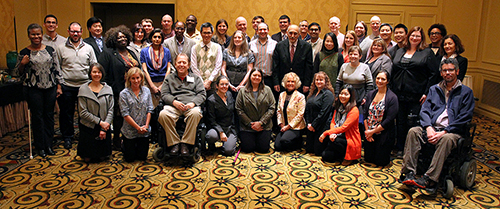
Stakeholder groups represented in the CBI included
- student service leaders and administrators,
- faculty members,
- students, and
- professional organizations.
The following individuals participated in the CBI.
Andersen, Christopher
Director, STEM Initiatives
Ohio State University
Atchison, Christopher
Assistant Professor
University of Cincinnati
Bennett, Cynthia
Ph.D. Student
University of Washington
Bhatti, Pamela
Associate Professor
Georgia Institute of Technology/Emory School of Medicine
Blaser, Brianna
Program Coordinator/Counselor
University of Washington
Burgstahler, Sheryl
Director, Accessible Technology Services
University of Washington
Cakmak, Maya
Assistant Professor, Computer Science and Engineering
University of Washington
Callahan, Bree
Director
University of Washington
Caspi, Anat
Director, Taskar Center for Accessible Technology
University of Washington
Chesney, David
Faculty
University of Michigan
Choi, Song
Assistant Dean
University of Hawaii at Manoa
Crawford, Lyla
Program Coordinator
University of Washington
Cree, Kevin
Student
Auburn University
Fahey, Katherine
Director, Student Disability Services
Cornell University
Garcia, Sergio
Graduate Research Assistant
Georgia Institute of Technology
Gepperth, Jason
Disability and STEM Resource Specialist
Wright State University
Gray, Kathryn
President, GrayTech Software, Inc.
University of Illinois, Urbana-Champaign engineering alumni
Hakansson, Nils
Assistant Professor
Wichita State University
Hefzy, Mohamed
Professor and Associate Dean of Graduate Studies of the College of Engineering
University of Toledo
Jenda, Overtoun
Associate Provost
Auburn University
Jones Calloway, Marcia
Director, Diversity & Inclusion
American Institute of Architects
Khan, Samee
Associate Professor
North Dakota State University
Ladner, Richard
Professor, Computer Science and Engineering
University of Washington
Lan, Mei-Fang
Clinical Assistant Professor
University of Florida
Lazar, Jonathan
Professor, Computer and Information Sciences
Towson University
Lee, Frank
Faculty
Bellevue College
Li, William
PhD Student / Graduate Instructor
MIT
Martin, Vincent
Graduate Research Assistant/ PhD student
Georgia Tech
McCombs, Michelle
Program Manager
Ohio State University
Mili, Fatma
Professor, Lead Purdue Polytechnic Institute
Purdue University
Moats, Steven
Director-Student Disability Resources
Iowa State University
Mortz, Margaret
Lecturer
Eastern Washington University
Park, Hae Won
Postdoctoral Fellow
Georgia Institute of Technology
Peixoto, Nathalia
Associate Professor
George Mason University
Sieglock, Joetta
Adaptive Technology Specialist
Eastern Washington University
Starling, Anna Leyf
Program Coordinator of The Engineering Place
North Carolina State University
Steele, Katherine
Assistant Professor, Mechanical Engineering
University of Washington
Stewart, Daniel
Graduate Research Assistant
University of Florida
Sundararajan, Sriram
Professor and Equity Advisor, College of Engineering
Iowa State University
Thompson, Constance
Senior Manager, Diversity & Inclusion
The American Society of Civil Engineers (ASCE)
Thompson, Terrill
Technoogy Accessibility Specialist
University of Washington
Tyson, Synge
Usability & Accessibility Consultant
Villalobos, Ric
Faculty Counselor
Spokane Community College
Wu, Chang-Yu
Professor and Department Head
University of Florida
Yasuhara, Ken
Research Scientist
University of Washington
Resources

Neuroscience for Neurodiverse Learners (NNL) compiles and creates resources for science, technology, engineering, and mathematics (STEM) educators working with neurodiverse students.
Community of Practice
NNL project staff and faculty leaders engage in an online Community of Practice (CoP) that includes key stakeholder groups that impact efforts to make neuroscience activities accessible for everyone (e.g., faculty, students, disability service units, informal science learning programs, teaching and learning centers, diversity programs, professional organizations). CoP participants share ideas and assist in the creation and dissemination of resources to encourage others to help a broader range of students and patrons learn about universal design and accessibility in neuroscience educational settings.
CoP members take part in the following:
- Identify and share ways to better serve neurodiverse students in classroom settings.
- Offer strategies for recruiting a wide variety of stakeholders to participate in project activities.
- Share disability-related and universal design content to be incorporated into classes.
- Learn about NNL events, training videos, resources, and publications.
- Identify unmet needs and useful products for the project to develop.
- Provide input for a project video and related online resources.
- Suggest future project activities.
Individuals can join the STEM Educators Community of Practice by contacting doit@uw.edu.
Knowledge Base
The NNL Knowledge Base currently contains over 650 Case Studies, Promising Practices, and Q&As regarding the accessibility of technology, college, graduate school, and careers for individuals with disabilities. Many articles focus on serving neurodiverse students effectively. Example articles include the following.
Promising Practices
- Across Campus and Beyond: A Promising Practice to Increase Conversations about Neurodiversity in the Engineering Classroom
- The Neurodiversity Initiative: A Promising Practice for Promoting Disability Awareness in Higher Education
Q&As
- Are there employment resources specifically designed to serve neurodivergent job seekers?
- What do “neurodiverse” and “neurodivergent” mean?
Case Studies
- Collaboration Struggles in an Engineering Lab: A Case Study About a Student with Autism
- Inaccessibility in a Calculus Course: A Case Study on Educating Faculty and Staff about Learning Disabilities
- Kim and Biology: A Case Study on Accommodations for Learning Disabilities
- Jan and Large Lectures: A Case Study on Accommodations for Psychiatric Disorders
Other Web Resources
Find informational briefs and videos on the NNL website.
- STEM and Neurodiversity: A Capacity Building Institute for Faculty at Community and Technical Colleges (2022)
Summaries and video presentations from the 2022 NNL CBI. - Equal Access: Universal Design of Neuroscience Education and Research
Learn how to create neuroscience facilities and resources accessible to people with disabilities. - Promising Practices That Engage People with Disabilities in the CNT
A series of strategies for including people with disabilities in other engineering research centers. - Checklist for Making Engineering Labs Accessible to Students with Disabilities
Designing engineering labs so that all students can fully participate. - Equal Access: Universal Design of Engineering Departments
Guidelines on creating an accessible engineering department using universal design. - Equal Access: Universal Design of Your Engineering Research Center (ERC)
A checklist for making ERCs welcoming, accessible, and usable. - Equal Access: Universal Design of Your Project
A checklist for making projects welcoming, accessible, and usable
Campus Resources
Many post-secondary campuses will house organizations and groups that are supportive of students with disabilities, including neurodiverse learners. Examples at the University of Washington campus include the following.
- Huskies for Neurodiversity: Huskies for Neurodiversity is a student-led initiative that promotes visibility and acceptance of neurodiversity at the UW campus and beyond through articles, lived experience interviews with neurodivergent people, interactive website, and panel events. Their goal is to destigmatize and educate about neurodiversity and disability accommodations on campus to students and faculty, as well as provide a platform for neurodivergent individuals to share their stories and experiences in their own voice.
- Associated Students of the University of Washington Student Disability Commission: The Commission was established to create communities for individuals with disabilities and their allies by providing programming, resources, and a safe accessible space.
- UW Disability and D/deaf Culture Center: The UW Disability and d/Deaf Culture Center fosters a climate of social justice and pride, centered on universal design, access, and diversity. It cultivates disability and d/Deaf pride by promoting social justice through an inclusive environment, sharing resources for self-advocacy, developing educational programming, engaging stakeholders with principles of universal design, and promoting a transforming socio-cultural understanding of disability.
- Mad Campus: Mad Campus is a peer group for students identifying with or experiencing madness, mental illness, and/or neurodiversity. Mad Campus meets throughout the school year on a semi-weekly basis.
- Disability Studies Program: Disability studies at the UW involves a multi-campus interdisciplinary group of faculty, staff, students, and community members, who share an interest in questions relating to society’s understanding of disability. The undergraduate disability studies minor and the individualized studies major in disability studies provide opportunities for students to develop a strong interdisciplinary foundation in the social, legal, and political framing of disability.
- Disabilities, Opportunities, Internetworking, and Technology (DO-IT): The DO-IT (Disabilities, Opportunities, Internetworking, and Technology) Center is dedicated to empowering people with disabilities through technology and education. It promotes awareness and accessibility—in both the classroom and the workplace—to maximize the potential of individuals with disabilities and make our communities more vibrant, diverse, and inclusive.
Acknowledgments
The April 2023 Neuroscience for Neurodiverse Learners Capacity Building Institute was funded by the National Science Foundation (grant #DRL-1948591). Any opinions, findings, and conclusions or recommendations expressed in this material are those of the CBI presenters, attendees, and authors and do not necessarily reflect the views of the National Science Foundation or the University of Washington.
DO-IT’s Neuroscience for Neurodiverse Learners
University of Washington
uw.edu/doit/programs/nnl
© 2023 University of Washington. Permission is granted to copy this publication for educational, noncommercial purposes, provided the source is acknowledged.